 28allday
522eef4b9e
28allday
522eef4b9e
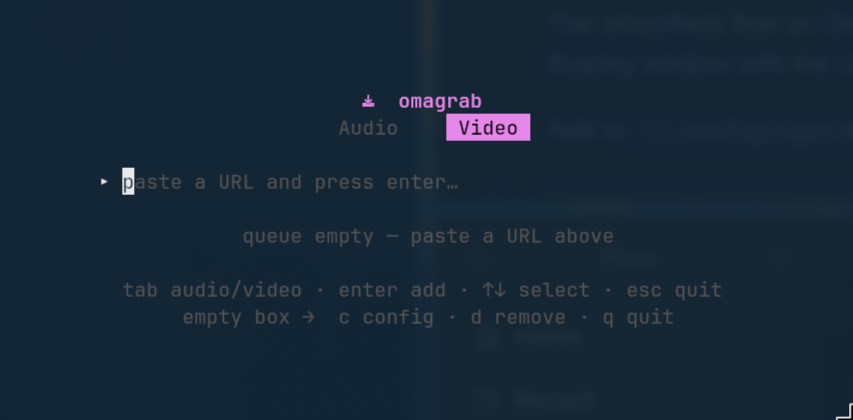
Replace the ASCII-art preview with an actual TUI screenshot. Co-Authored-By: Claude Opus 4.8 (1M context) <noreply@anthropic.com> |
||
|---|---|---|
| desktop | ||
| docs | ||
| extension | ||
| .gitignore | ||
| config.go | ||
| download.go | ||
| go.mod | ||
| go.sum | ||
| install-integration.sh | ||
| install.sh | ||
| LICENSE | ||
| main.go | ||
| main_test.go | ||
| model.go | ||
| README.md | ||
| view.go | ||
omagrab
A fast, keyboard-driven yt-dlp TUI for Omarchy — paste a URL, pick Audio or Video, and watch it download with live progress. Built with Go + Bubble Tea.
Omarchy only. This is built specifically for Omarchy and isn't intended to be distro-portable. It relies on
xdg-terminal-exec, Hyprland window rules, Wayland +wl-clipboard, and a Nerd Font terminal. There are no X11 / non-Omarchy fallbacks.
Features
- Works with any yt-dlp-supported site — paste a link and go.
- Dual mode —
Tabtoggles ♪ Audio ↔ 🎬 Video. - Paste-and-queue — drop in a URL, press
Enter, keep adding. A worker downloads them one at a time with live progress, speed and ETA. - Audio — extracts to your chosen format (opus / mp3 / m4a / flac) with metadata and thumbnail embedded, into your audio directory.
- Video — quality selector (best / 2160 / 1440 / 1080 / 720), merged to mp4, with optional English subtitles, into your video directory.
- Config view — change format, quality and subtitles inline; saved to
~/.config/omagrab/config.json. - Clipboard launch —
omagrab --clippre-fills the URL from your clipboard, perfect for a Hyprland keybind (see below). - Dependency check — tells you exactly what to
pacman -Sif anything's missing.
Requirements
- yt-dlp
- ffmpeg (for extraction, merging and embedding)
wl-clipboard(only for the--clip/ clipboard launch flow)
sudo pacman -S yt-dlp ffmpeg wl-clipboard
Install
One line — pulls in yt-dlp, ffmpeg and wl-clipboard via pacman if they're
missing, installs the binary to ~/.local/bin, and (on Omarchy) adds a floating
Walker entry:
curl -fsSL https://raw.githubusercontent.com/28allday/omagrab/main/install.sh | bash
Or from a clone (builds from source if Go is present, otherwise downloads the latest released binary):
git clone https://github.com/28allday/omagrab.git
cd omagrab
./install.sh
Make sure ~/.local/bin is on your PATH. The installer prints the optional
SUPER+SHIFT+V clipboard keybind for you to add.
Usage
omagrab            # open the TUI
omagrab <URL>      # open with a URL pre-filled
omagrab --clip     # open with the URL from your clipboard pre-filled
omagrab --help
Keys
| Key | Action |
|---|---|
Tab |
Switch Audio ↔ Video mode |
Enter |
Add the URL in the box to the queue |
↑ / ↓ |
Select a queue item |
c |
Open config (when the URL box is empty) |
d / x |
Remove the selected item (when the box is empty) |
q / Esc |
Quit |
In the config view: ↑↓ move, ←→ change a value, Esc saves and returns.
Single-letter commands (
c,d,q) only act when the URL box is empty — so they never get swallowed while you're typing or pasting a link.
Clipboard keybind (recommended)
The smoothest flow on Omarchy: copy a link in your browser, then summon omagrab as a floating window with the URL already filled in.
Add to ~/.config/hypr/bindings.conf:
bindd = SUPER SHIFT, V, omagrab, exec, xdg-terminal-exec --app-id=omagrab -e omagrab --clip
And a floating rule in ~/.config/hypr/windows.conf (Hyprland ≥ 0.55 syntax):
windowrule = float on,     match:class ^(omagrab)$
windowrule = center on,    match:class ^(omagrab)$
windowrule = size 520 260, match:class ^(omagrab)$
Reload Hyprland (hyprctl reload). Now: copy a link → SUPER+SHIFT+V →
omagrab floats with the URL ready → Tab to pick mode → Enter.
Configuration
~/.config/omagrab/config.json:
{
  "audio_dir": "~/Music",
  "video_dir": "~/Videos",
  "audio_format": "opus",
  "video_quality": "best",
  "subtitles": false
}
Edit it directly, or change format / quality / subtitles from the in-app config
view (c). Directories support a leading ~.
A note on copyright
Please only download content you have the right to. That means your own uploads,
content released under a permissive licence (e.g. Creative Commons), public-domain
material, or anything you otherwise have permission to download. Downloading other
people's content without permission may be copyright infringement (in the UK this
can be a civil matter) and generally breaches the terms of service of the sites
involved. omagrab is a convenience wrapper around yt-dlp; how you use it is your
responsibility.
License
MIT © 2026 Gavin Nugent