 28allday
4ce4856134
28allday
4ce4856134
Both the Walker entry and the optional clipboard keybind now use the dedicated
'omagrab' app-id, and the installer writes the float/center/size rule to
windows.conf (idempotent, backed up, reloads Hyprland). No manual window-rule
step left — only the optional keybind is printed.

Co-Authored-By: Claude Opus 4.8 (1M context) <noreply@anthropic.com>
5.1 KiB
omagrab
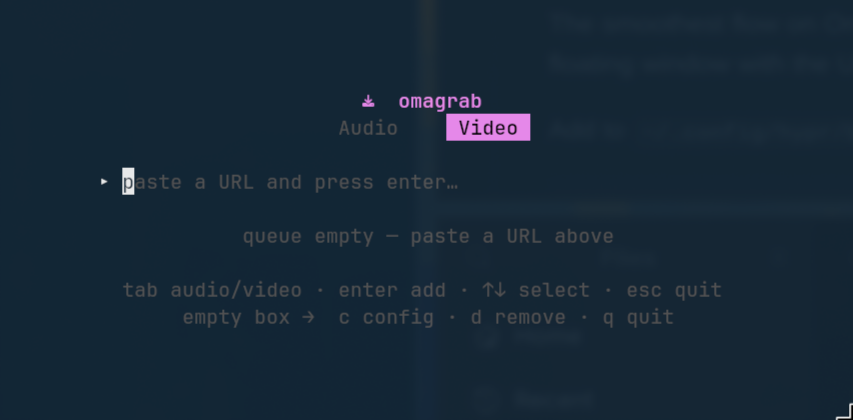
A fast, keyboard-driven yt-dlp TUI for Omarchy — paste a URL, pick Audio or Video, and watch it download with live progress. Built with Go + Bubble Tea.
Omarchy only. This is built specifically for Omarchy and isn't intended to be distro-portable. It relies on
xdg-terminal-exec, Hyprland window rules, Wayland +wl-clipboard, and a Nerd Font terminal. There are no X11 / non-Omarchy fallbacks.
Features
- Works with any yt-dlp-supported site — paste a link and go.
- Dual mode —
Tabtoggles ♪ Audio ↔ 🎬 Video. - Paste-and-queue — drop in a URL, press
Enter, keep adding. A worker downloads them one at a time with live progress, speed and ETA. - Audio — extracts to your chosen format (opus / mp3 / m4a / flac) with metadata and thumbnail embedded, into your audio directory.
- Video — quality selector (best / 2160 / 1440 / 1080 / 720), merged to mp4, with optional English subtitles, into your video directory.
- Config view — change format, quality and subtitles inline; saved to
~/.config/omagrab/config.json. - Clipboard launch —
omagrab --clippre-fills the URL from your clipboard, perfect for a Hyprland keybind (see below). - Dependency check — tells you exactly what to
pacman -Sif anything's missing.
Requirements
- yt-dlp
- ffmpeg (for extraction, merging and embedding)
wl-clipboard(only for the--clip/ clipboard launch flow)
sudo pacman -S yt-dlp ffmpeg wl-clipboard
Install
One line — pulls in yt-dlp, ffmpeg and wl-clipboard via pacman if they're
missing, installs the binary to ~/.local/bin, and (on Omarchy) adds a Walker
entry plus the Hyprland rule that makes omagrab float small and centered:
curl -fsSL https://raw.githubusercontent.com/28allday/omagrab/main/install.sh | bash
Or from a clone (builds from source if Go is present, otherwise downloads the latest released binary):
git clone https://github.com/28allday/omagrab.git
cd omagrab
./install.sh
Make sure ~/.local/bin is on your PATH. The installer also prints an optional
SUPER+SHIFT+V clipboard keybind for you to add (see below).
Usage
omagrab            # open the TUI
omagrab <URL>      # open with a URL pre-filled
omagrab --clip     # open with the URL from your clipboard pre-filled
omagrab --help
Keys
| Key | Action |
|---|---|
Tab |
Switch Audio ↔ Video mode |
Enter |
Add the URL in the box to the queue |
↑ / ↓ |
Select a queue item |
c |
Open config (when the URL box is empty) |
d / x |
Remove the selected item (when the box is empty) |
q / Esc |
Quit |
In the config view: ↑↓ move, ←→ change a value, Esc saves and returns.
Single-letter commands (
c,d,q) only act when the URL box is empty — so they never get swallowed while you're typing or pasting a link.
Clipboard keybind (optional)
The smoothest flow on Omarchy: copy a link in your browser, then summon omagrab as a floating window with the URL already filled in.
The installer already added the floating window rule (omagrab floats small and
centered however it's launched), so all you need is the keybind. Add to
~/.config/hypr/bindings.conf:
bindd = SUPER SHIFT, V, omagrab, exec, xdg-terminal-exec --app-id=omagrab -e omagrab --clip
Reload Hyprland (hyprctl reload). Now: copy a link → SUPER+SHIFT+V →
omagrab floats with the URL ready → Tab to pick mode → Enter.
Both the Walker entry and this keybind use the
omagrabapp-id, so the single window rule the installer wrote to~/.config/hypr/windows.confcovers them both. If you ever want to tweak the size, edit thewindowruleblock there.
Configuration
~/.config/omagrab/config.json:
{
  "audio_dir": "~/Music",
  "video_dir": "~/Videos",
  "audio_format": "opus",
  "video_quality": "best",
  "subtitles": false
}
Edit it directly, or change format / quality / subtitles from the in-app config
view (c). Directories support a leading ~.
A note on copyright
Please only download content you have the right to. That means your own uploads,
content released under a permissive licence (e.g. Creative Commons), public-domain
material, or anything you otherwise have permission to download. Downloading other
people's content without permission may be copyright infringement (in the UK this
can be a civil matter) and generally breaches the terms of service of the sites
involved. omagrab is a convenience wrapper around yt-dlp; how you use it is your
responsibility.
License
MIT © 2026 Gavin Nugent